For Canadian Firm Owners and Partners

Your team keeps recreating work the firm already paid for.

Your firm creates the knowledge, daily.
Renshi CodaraFlow helps your team find and reuse it to produce client-ready emails, advisory letters, step letters, and Canadian tax calculations.

Every recreated explanation is billable time spent again. Every duplicate client calculation is capacity the firm can't allocate elsewhere.

AI Creates More Content. It Doesn't Organize It.

AI produces better answers faster.The rest of the firm still can't find, reuse, or build on them.AI creates individual productivity. CodaraFlow creates organizational productivity.

Where the Hours Go

Every Office Recreates It.

The same client question gets researched, explained, and documented multiple times because nobody knows it already exists.

Senior Time Is the Cost.

Partners and senior staff spend time recreating work instead of reviewing files, advising clients, or bringing in new business.

Rewrites Create Inconsistency.

Different wording. Different calculations. Different conclusions. Consistency becomes dependent on who happens to answer.

None of it shows up on an invoice. It just quietly caps how much work the firm can take on.

The Fix

Turn Everyday Client Work Into Reusable Firm Assets

As your team answers questions, writes explanations, and runs the numbers, that work becomes reusable. The next file starts from the firm's reviewed version, not a blank page. It works from the first project, with nothing to build first.

Senior Time Goes Back to Clients

Partners stop being the firm's search engine. Hours return to review, advice, and new business.

Reuse Instead of Recreate

The firm's reviewed answer drops into the next letter/email/calculation.

One Firm Standard, Used Every Time

Everyone starts from the same reviewed version.

The Work Stays With the Firm

Still there, still usable, after the person who produced it moves on.

Capture It Where It Happens

Two Clicks From a Browser Tab to the Firm's Library

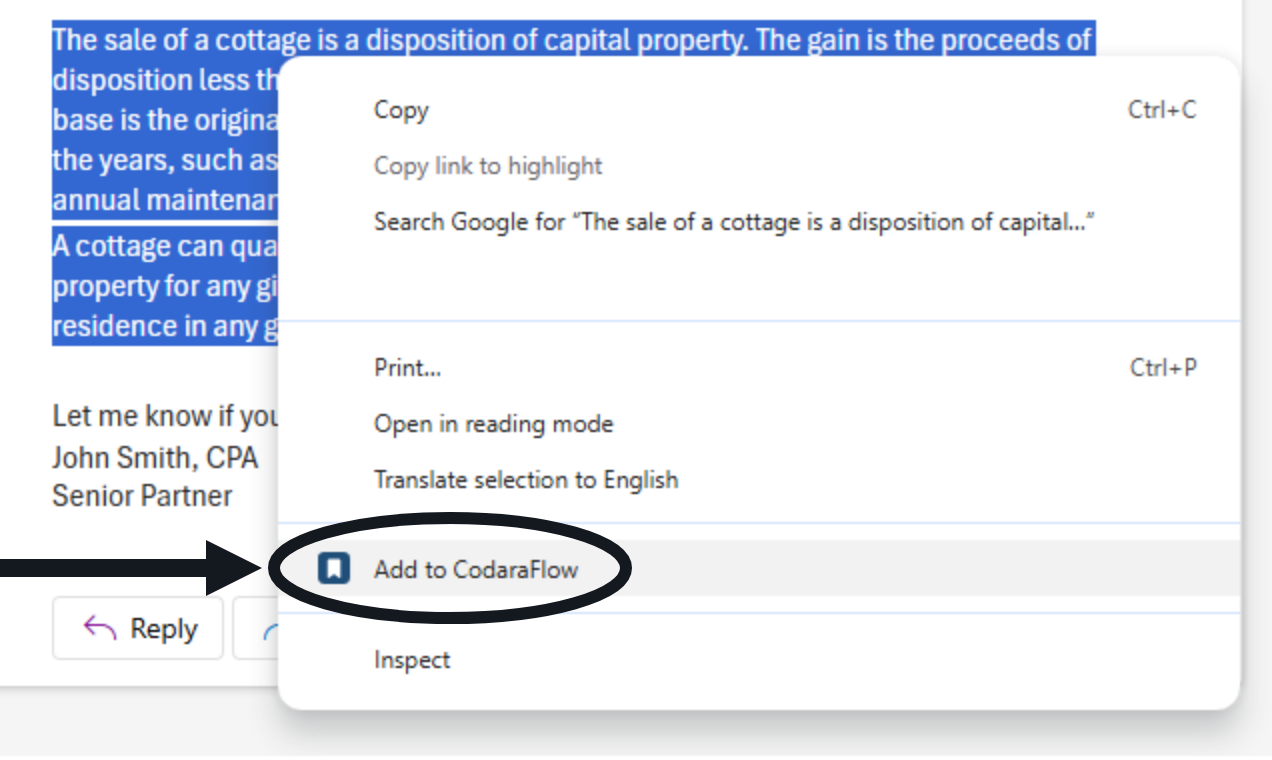
Your staff's research happens in a browser: an AI answer, a CRA page, a technical bulletin, an email they're drafting in Outlook on the web. Highlight the wording, right-click, and Add to CodaraFlow files it in your firm's library with its formatting intact.

  • Nothing reaches a client unapproved: a capture from anyone without approval rights lands in the approval queue, not the library
  • Revised to your firm's standard and saved, then searchable firm-wide and available to drop into the next letter, email, or calculation
  • Building blocks, not finished letters: the explanations that repeat come from the library, so the time goes into what is unique to each client

Chrome and Edge, on Windows, macOS and Linux.
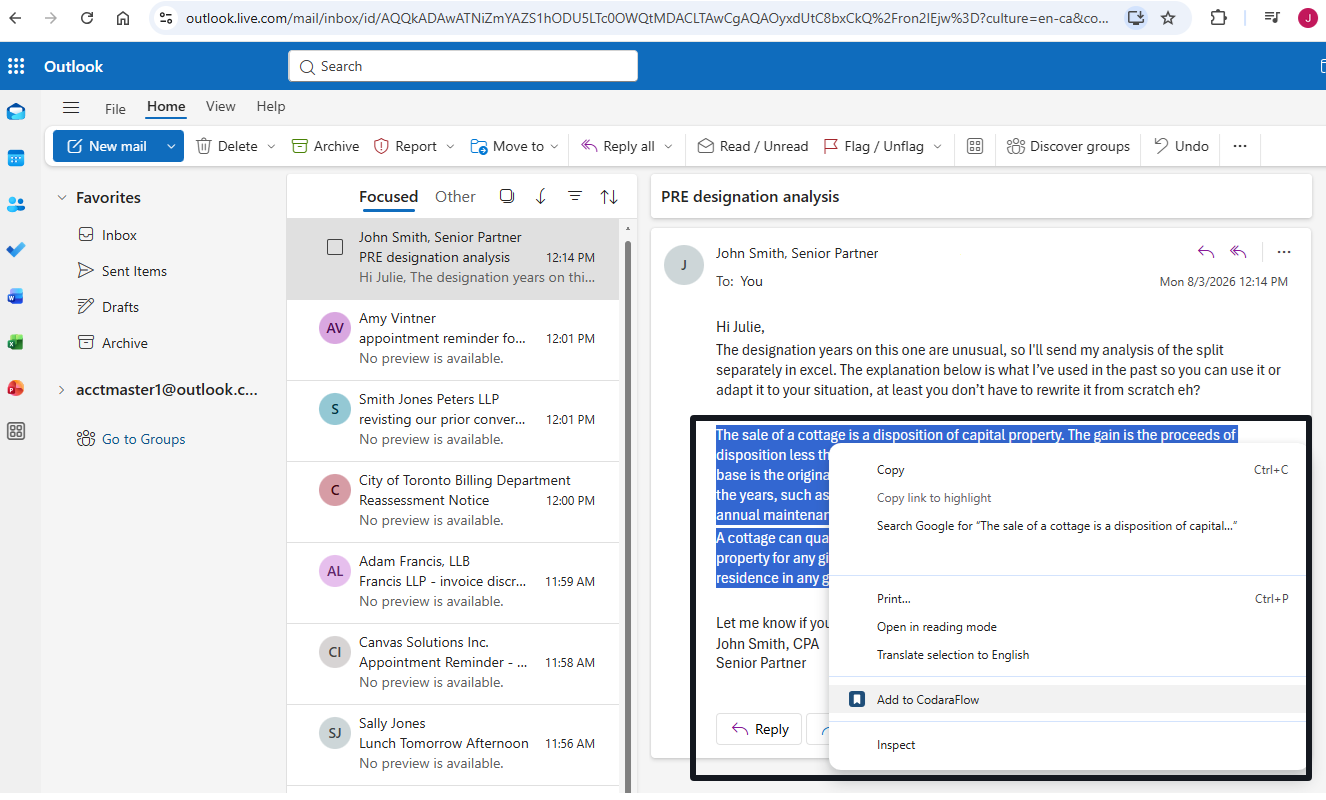
The firm's libraries build effortlessly, from the content produced daily.

An email open in a browser with a paragraph of wording highlighted
Add to CodaraFlow on the browser right-click menu, over the highlighted wording
"Should I pay myself salary or dividends this year?"
"What happens tax-wise if I sell the business?"
"What does the estate actually owe when I die?"

The Questions Clients Ask Every Week, Answered With Real Numbers

Every one of those questions becomes a client-ready answer, backed by a built-in calculation. Enter the client's numbers and produce a finished client-ready section, complete with the calculations, tables, and your firm's reviewed explanation. Minutes, not hours.

Planner-grade computations your tax-prep software does not have and spreadsheets do badly. Click any calculator above for more information on how it works and provides accurate calculations.

See Reuse in Action

Watch real client deliverables built from work the firm already completed.

Client Question to Client AnswerSalary or dividends? Reuse the firm's reviewed explanation, complete the calculation, and produce a client-ready answer in minutes.
A Complex Letter Builds ItselfWatch a corporate reorganization letter assemble itself as the preparer enters the client's facts.
Find It. Reuse It. Move On.Search the firm's reviewed explanations, calculations, and letters in seconds instead of starting from scratch.

Everything exports as a fully editable Word document on your firm's letterhead, ready for review, filing, or delivery.

The Firm's Standard, Not the Individual's

Reuse only helps if the numbers are right, the wording is the firm's own, and management can set that for everybody.

The Tax CalculatorsSixteen Canadian tax calculators, each drafting its own finished section, in every letter, every email, and standing on their own.
Two Libraries, Internal and ExternalApproved wording that goes to clients, and internal guidance that never does, a click apart from any letter.
The Firm Admin's WorkflowOne menu sets the firm up: letterhead, letter wording, calculator rates, users and roles, branding, and the audit log.
See how much work your firm can stop recreating.Get a Demo Login

From Solo Practices to National Tax Teams

Firms With a Tax Practice

Someone Else Already Solved It. Finding It Is the Challenge.

The same answer written independently in three offices because nobody knows it already exists. At volume the duplicate work happens across people rather than across time.

See It in Action
  • One firm standard, whoever writes it
  • Reviewed work stays reviewed: a sign-off clears only when the content actually changes
  • The work stays with the firm when the person who wrote it leaves
Solo and Small Practices

You Already Solved It. Remembering It Is the Challenge.

The same explanation rewritten months later because it can't be found. At low volume the duplicate work happens across time rather than across people.

See It in Action
  • Your own past files answer the next one
  • Less senior time recreating finished work
  • More client work without adding headcount
Before You Ask

Does This Add More Work?

Your firm already spends the time creating the content. Saving it once takes far less time than recreating it again and again.

Why Not Just Use ChatGPT?

Use it. Then keep the good output. AI gives you a draft nobody has checked. CodaraFlow is where the checked version lives, so the next person doesn't prompt for it again.

Why Not SharePoint or the Network Drive?

Because a folder holds documents, not answers. You can't search a network drive for the firm's position on a shareholder loan and drop it straight into a client letter on your letterhead.

Frequently Asked Questions

See It With Your Own Content

Access Within 24 Hours

Get a working demo account. Create a project, add your own content, run the calculations, and export your own client deliverables.

Your Client Data Never Goes to an AI

Approved wording comes in from wherever you found it. Client data never goes out. Letters are assembled from the facts you enter and your firm's approved wording, never generated.

You Own the Output

Export fully editable Word documents on your firm's letterhead. No proprietary format. Monthly pricing. No long-term contracts.

Request Demo Access

Request access to a working demo account.

No card, no obligation. A person reads every request.

No AI Access to Client DataFully Editable Word OutputMonthly Pricing. No Long-Term Contracts.
Get a Demo Login